

A bit of background:
I recently got assigned a feature to build on a Koa backend at work. Most of my day-to-day work is on the frontend, but I'd used Express a little as a student. Since both are well-known Node.js web frameworks, the code didn't feel entirely unfamiliar. They have plenty in common, but working with Koa showed me just how different their design choices and day-to-day experience can be.
Introduction
Express is the best-known and most downloaded Node.js web framework. Released in 2010, it was among the first web frameworks built specifically for Node.js. Its approachable API, useful features, and wealth of community resources quickly made it a go-to tool. It helped the Node.js ecosystem grow and influenced the design of many frameworks that followed.
In 2013, the team behind Express introduced a new framework: Koa. Koa focuses on a small, simple core, leaving out built-in middleware so developers can choose the modules they need. One of its defining features is native async/await support, which addresses some of Express's limitations around synchronous and asynchronous operations. Express middleware, by comparison, is callback-based: its next() function executes synchronously and can't wait for downstream middleware to finish in the way Koa can. We'll look at examples of this later.
This post brings together what I learned about the core differences between Express and Koa. If you've ever been digging through documentation and had that little “Oh, that's how it works!” moment, I hope you'll find a few of those here too.
Built-in Features
Express: Ready to Use
If you've used Express, you probably know how convenient it is. It comes close to being a complete framework, with enough built-in functionality to get a project running without hunting down lots of third-party packages. It also provides handy methods for common tasks:
express.Router(): Flexible routing.express.static(): Setting up static file serving.express.set(): Application settings.express.json()andexpress.urlencoded(): Built-in body parsers for JSON and URL-encoded request bodies.
Here's a simple example:
const express = require('express');
const app = express();

app.use(express.json()); // Built-in body parser
app.get('/', (req, res) => {
  res.send('Hello from Express!');
});

app.listen(3000, () => console.log('Express server running on http://localhost:3000'));
This sets up a basic HTTP server in just a few lines. We can handle routing and request parsing without installing any additional third-party packages.
Koa: A Minimal Core
Koa takes a different approach: keep the core as small as possible. It includes no default middleware, so even basic routing and body parsing require separate packages. This gives us a lot of freedom to assemble an application around our own needs.
Koa is particularly useful for HTTP services that don't need extensive routing, such as webhooks or chatbots. It doesn't impose a structure, so we can choose the middleware that fits the task.
Here's how to add routing and a body parser to Koa:
const Koa = require('koa');
const Router = require('@koa/router');
const bodyParser = require('koa-bodyparser');

const app = new Koa();
const router = new Router();

app.use(bodyParser()); // The body parser must be added separately

router.get('/', (ctx) => {
  ctx.body = 'Hello from Koa with Router and Body Parser!';
});

app.use(router.routes()).use(router.allowedMethods());

app.listen(3000, () => console.log('Koa server running on http://localhost:3000'));
We need to install packages such as @koa/router and koa-bodyparser ourselves to cover functionality Express includes. That keeps Koa's core simple and gives us plenty of control. Of course, that freedom also means more decisions and setup, which can take some getting used to if you're used to getting a project running quickly.
Handling Requests and Responses
Express: The req and res Objects
In Express, requests and responses revolve around req (Request) and res (Response). Express builds these on Node.js's native http.IncomingMessage and http.ServerResponse, adding properties and methods that make development easier.
req exposes request data through properties such as:
req.body: Data from a POST request.req.params: Route parameters.req.query: URL query parameters.
The res object handles the response:
res.send(): Sends a response.res.json(): Sends a JSON response.res.status(): Sets the HTTP status code.
Here's a simple Express example:
const express = require('express');
const app = express();

app.use(express.json()); // Parse JSON request bodies

app.get('/greet/:name', (req, res) => {
  const name = req.params.name;
  res.status(200).json({ message: `Hello, ${name}!` });
});

app.listen(3000, () => console.log('Express server is running on http://localhost:3000'));
Koa: The ctx Context Object
Koa handles requests and responses through ctx (Context). It brings request and response together under one clean API.
Each request gets its own ctx, through which we can read or modify the request and response. Koa wraps Node.js's native req and res as ctx.request and ctx.response, adding functionality along the way.
Common request operations include:
ctx.request.body: Accessing POST data, with koa-bodyparser.ctx.params: Accessing route parameters, with a router such as @koa/router.ctx.query: Accessing URL query parameters.
For responses:
ctx.body: Sets the response body.ctx.status: Sets the HTTP status code.
Here's a simple Koa example:
const Koa = require('koa');
const Router = require('@koa/router');
const bodyParser = require('koa-bodyparser');

const app = new Koa();
const router = new Router();

app.use(bodyParser()); // Parse JSON request bodies

router.get('/greet/:name', (ctx) => {
  const name = ctx.params.name;
  ctx.status = 200;
  ctx.body = { message: `Hello, ${name}!` };
});

app.use(router.routes()).use(router.allowedMethods());

app.listen(3000, () => console.log('Koa server is running on http://localhost:3000'));
Beyond ctx.request and ctx.response, ctx provides useful helper methods and properties for everyday tasks:
ctx.querystring: Returns the raw query string. Forhttp://localhost:3000/greet?name=John&age=30, this is"name=John&age=30".ctx.throw(status, message): Throws an error to simplify error handling. For example,ctx.throw(400, 'Bad Request')interrupts downstream middleware at that point and returns a 400 status with an error message.ctx.state: A shared object for passing data between middleware. Authentication middleware might set user information here for later business logic to use.ctx.is(types): Checks whether the request's Content-Type matches the given types. For example,ctx.is('json', 'text')checks for JSON or plain text.
How Middleware Executes
Middleware processes a request before it reaches a route handler, or handles work before the response goes out. Common uses include logging, authentication, error handling, and body parsing. It makes an application more modular and easier to extend and maintain. Think of a series of gatekeepers: each handles one part of the request, breaking the application logic into small, clear steps.
There's a key difference in how Express and Koa approach this:
- Express middleware is callback-based, and
next()executes synchronously. Code afternext()continues without waiting for downstream asynchronous middleware to finish. - Koa middleware is Promise-based, with support for
async/await. Atawait next(), execution pauses until downstream middleware finishes, then resumes with the following code. This follows the “onion model” and makes asynchronous flow easier to follow.
The Onion Model
Before we look more closely at the two implementations, let's introduce the onion model, the basis of Koa's middleware design. A request passes through the outermost middleware and works its way inward, layer by layer. Once the inner work is done, execution returns outward through those same layers. This familiar diagram illustrates the idea:
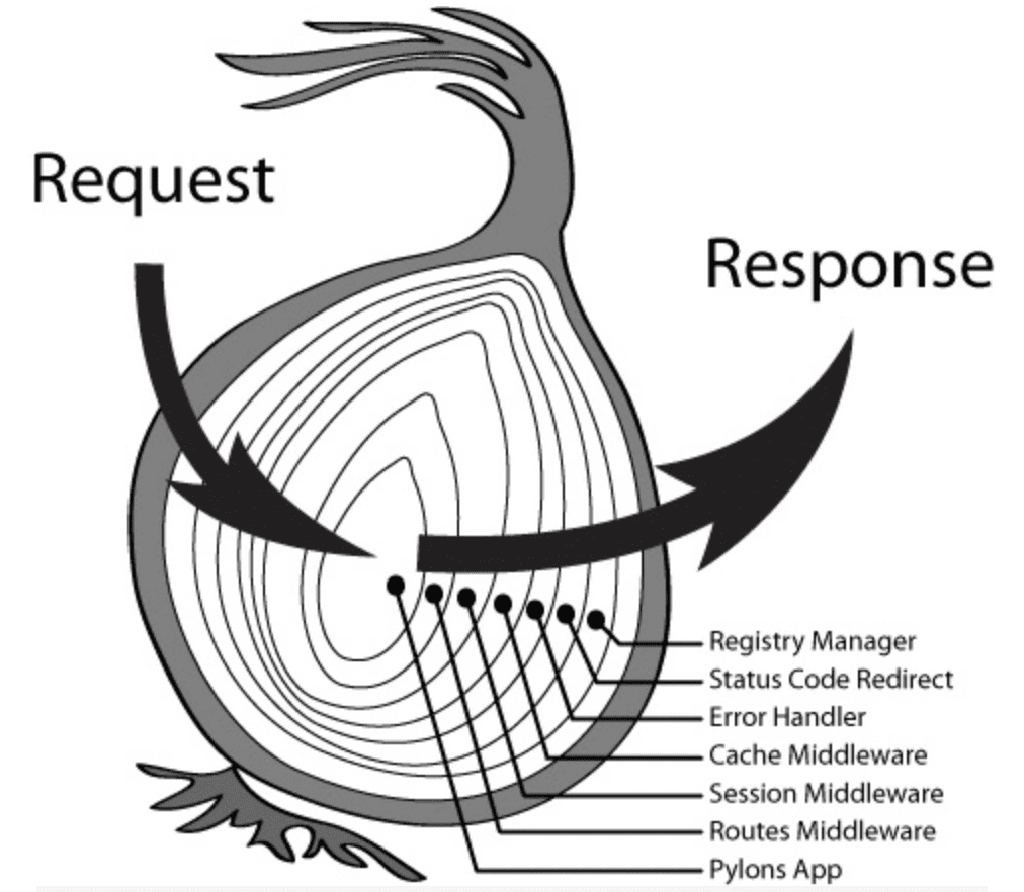
We can divide this into two phases:
- Entering: Code before
next()runs from the first registered middleware to the last. - Returning: Code after
next()runs in reverse, from the last registered middleware back to the first.
Express: Linear, Synchronous Execution
As mentioned earlier, Express follows a linear, synchronous middleware model. Middleware runs in registration order, passing control onward through next(). With asynchronous operations, though, that synchronous behavior can make the execution order a little surprising.
An example to follow
This example mixes synchronous and asynchronous Express middleware:
import { Request, Response, NextFunction } from "express";

export const syncMiddleware = (
  req: Request,
  res: Response,
  next: NextFunction
) => {
  console.log("1. Sync middleware - Before next");
  next();
  console.log("1. Sync middleware - After next");
};

export const asyncMiddleware = async (
  req: Request,
  res: Response,
  next: NextFunction
) => {
  console.log("2. Async middleware - Before next");
  await new Promise<void>((resolve) =>
    setTimeout(() => {
      console.log("2. Async middleware - Before next: waited 1 second");
      resolve();
    }, 1000)
  ); // Simulate asynchronous work
  next();
  console.log("2. Async middleware - After next");
};

export const terminateMiddleware = (
  req: Request,
  res: Response,
  next: NextFunction
) => {
  console.log("3. Terminating middleware - Before termination");
  res.send("Request terminated by middleware");
  // Do not call next(); end the request here
};
Output
1. Sync middleware - Before next
2. Async middleware - Before next
1. Sync middleware - After next
2. Async middleware - Before next: waited 1 second
3. Terminating middleware - Before termination
2. Async middleware - After next
If Express is new to you, that output may take a moment to make sense of. Why does 1. Sync middleware - After next run before 2. Async middleware - Before next: waited 1 second?
What's happening
Express middleware is callback-based. Calling next() immediately passes control to the next middleware, but the code after it doesn't wait for that middleware's asynchronous work to finish. If we broke the flow down into callbacks, it would look roughly like this:
((req, res) => {
  console.log("1. Sync middleware - Before next");
  ((req, res) => {
    console.log("2. Async middleware - Before next");
    // Start the asynchronous work and wait
    (async (req, res) => {
      console.log("2. Async middleware - Before next: waited 1 second");
      await new Promise((resolve) => setTimeout(resolve, 1000));
      ((req, res) => {
        console.log("3. Terminating middleware - Before termination");
        res.send("Request terminated by middleware");
      })(req, res);
      console.log("2. Async middleware - After next");
    })(req, res);
  console.log("1. Sync middleware - After next");  // This runs before the asynchronous result is ready
})(req, res);
If that still feels a bit hard to follow, this sequence diagram shows the order inside the middleware:
Some articles describe Express middleware as a FIFO Queue (first in, first out), but I find that misleading. The actual order depends on whether asynchronous operations are involved.
LIFO behavior with synchronous operations
Without asynchronous work, the order around next() is closer to a LIFO (last in, first out) call stack. next() passes control inward; once all the entry logic has run, execution returns from the last middleware back through the earlier ones, just as a stack unwinds.
Asynchronous operations and the event loop
With operations such as setTimeout or Promise, the order becomes more involved. Asynchronous tasks enter the event queue and run when the main thread is available. The JavaScript event loop therefore affects middleware execution:
- Entering: Synchronous logic runs in registration order until it reaches asynchronous work.
- Asynchronous work: Tasks wait in the event queue while the main thread continues processing other middleware.
- Returning: When the asynchronous tasks finish, the main thread regains control and continues with the code after
next().
Express middleware is therefore more than a simple FIFO queue: it combines LIFO behavior for synchronous calls with asynchronous scheduling through the event loop.
Koa: The Onion Model
Now that we've seen Express's linear, synchronous approach, let's look at Koa. Its onion model makes the order clear and predictable: outside in, then inside out.
An example to follow
Here's a simple Koa middleware example:
import { Context, Next } from "koa";

export const syncMiddleware = async (ctx: Context, next: Next) => {
  console.log("1. Sync middleware - Before next");
  await next();
  console.log("1. Sync middleware - After next");
};

export const asyncMiddleware = async (ctx: Context, next: Next) => {
  console.log("2. Async middleware - Before next");
  await new Promise<void>((resolve) =>
    setTimeout(() => {
      console.log("2. Async middleware - Before next: waited 1 second");
      resolve();
    }, 1000)
  );
  await next();
  console.log("2. Async middleware - After next");
};

export const terminateMiddleware = async (ctx: Context, next: Next) => {
  console.log("3. Terminating middleware - Before termination");
  ctx.body = "Request terminated by middleware";
  // Do not call next(); end the request here
};
Output:
1. Sync middleware - Before next
2. Async middleware - Before next
2. Async middleware - Before next: waited 1 second
3. Terminating middleware - Before termination
2. Async middleware - After next
1. Sync middleware - After next
What's happening
Koa's Promise-based middleware follows this order:
- Entering (outside in):
await next()passes control to the next middleware. - Returning (inside out): Once the inner middleware finishes, control returns to the current middleware and execution continues after
next().
Compared with Express, Koa's middleware order is much easier to predict. Whether the logic is synchronous or asynchronous, it goes outside in, then inside out. That gives us a more manageable flow. It's especially useful with asynchronous work, where the clearer control flow leaves us with less to keep in our heads.
A Closer Look at Middleware Execution
Express: Pitfalls Around Sending a Response
In Express, sending a response with a method such as res.send() ends the request flow, without continuing to subsequent middleware or code. Accidentally calling next() after sending the response can produce this error:
Error: Cannot set headers after they are sent to the client
The response headers have already been sent, so they can't be changed again. We need to take care with logic after a response and avoid unnecessary calls to next().
Example:
import { Request, Response, NextFunction } from "express";

export const terminateMiddleware = (
  req: Request,
  res: Response,
  next: NextFunction
) => {
  console.log("3. Terminating middleware - Before termination");
  res.send("Request terminated by middleware");
  next(); // Causes this error: Cannot set headers after they are sent to the client
};
Expected output:
1. Terminating middleware - Before termination
Express Error: Error: Cannot set headers after they are sent to the client
When writing Express middleware:
- Ending the chain: Avoid calling
next()after the response logic finishes. - Error responses: When sending an error response, such as
res.status(500).send(), stop passing responsibility to subsequent handlers. - Clear control flow: Keep response handling explicit and controlled throughout the middleware chain to avoid unexpected errors from misusing
next().
Koa: Continuing After Setting a Response
Koa allows downstream middleware to keep running even after ctx.body has been set. This gives us the flexibility to do more work after preparing a response, such as logging or cleanup.
Example:
import { Context, Next } from "koa";

export const terminateMiddleware = async (ctx: Context, next: Next) => {
  console.log("3. Terminating middleware - Before termination");
  ctx.body = "Request terminated by middleware";
  await next(); // Downstream middleware still runs after ctx.body is set
};

export const logMiddleware = async (ctx: Context, next: Next) => {
  console.log("4. Logging middleware - Running");
  await next();
  console.log("4. Logging middleware - Complete");
};
Expected output:
3. Terminating middleware - Before termination
4. Logging middleware - Running
4. Logging middleware - Complete
...
- Continued execution: Setting
ctx.bodydoesn't prevent downstream middleware from running, unless the flow is interrupted, for example by throwing an error. - Flexibility: After setting the response, we can still perform tasks such as:
- Logging: Recording request and response information.
- Cleanup: Releasing database connections or clearing temporary data.
- Monitoring: Collecting performance data or tracing requests.
Error Handling
Error Handling in Express
Express has two kinds of middleware:
- Regular middleware takes
(req, res, next)and handles normal request and response logic. - Error-handling middleware takes
(err, req, res, next)and must declare all four parameters. Express recognizes this signature and uses it to catch and handle application errors.
When Express sees the four-argument signature (err, req, res, next), it treats the function as error-handling middleware and runs it when:
- Middleware or a route handler calls
next(error). - Code throws an exception, such as
throw new Error(...).
When an error occurs, Express skips subsequent regular middleware and goes straight to error-handling middleware.
An error-handling example
Here's how that looks in Express:
app.use((req, res, next) => {
  console.log("First middleware - Before next");
  next(new Error("Simulated error"));
  console.log("First middleware - After next"); // This line still runs
});

app.use((req, res, next) => {
  console.log("Second middleware");
  next(); // This line does not run because the error has been passed to error-handling middleware
});

// Error-handling middleware must come after all other middleware and routes
app.use((err, req, res, next) => {
  console.error("Error caught:", err.message);
  res.status(500).send("An error occurred");
});
Output:
First middleware - Before next
First middleware - After next
Error caught: Simulated error
- What
next(error)does:- It skips regular middleware and passes control to error-handling middleware.
- It doesn't stop the calling middleware's code from running. Logic after
next()still executes, such as theAfter nextlog in the example.
- Where error-handling middleware goes:
- Put it after all other middleware and routes; otherwise, it won't catch their errors.
- Throwing exceptions:
- An explicit
throwalso triggers error-handling middleware, asnext(error)does.
- An explicit
As discussed earlier, Express uses a linear execution model: next() passes control to the next middleware or route. If the error handler comes earlier, it can't correctly catch errors passed forward by next(error).
Error Handling in Koa
Koa takes a fundamentally different approach. Native async/await and try...catch make the flow more straightforward. Each layer can catch and handle errors without requiring separate, dedicated error-handling middleware.
How it works
- Catching with
try...catch: Each middleware can catch exceptions withtry...catch. Uncaught errors propagate to the application-wide error listener. - Stopping the flow: When an error occurs, execution doesn't continue with the code after
next(), preventing unnecessary work. - Application-wide error listener:
ctx.app.emit('error', err, ctx)passes errors to a shared listener for centralized handling.
Example:
Here's a simple example using try...catch in Koa:
import Koa, { Context, Next } from 'koa';

const app = new Koa();
// Application-wide error listener
app.on('error', (err, ctx) => {
  console.error('Application-wide error listener caught:', err.message);
  // Add logging, notifications, or other handling here
});

// Regular middleware with try...catch to catch errors
app.use(async (ctx: Context, next: Next) => {
  try {
    console.log('First middleware - Before next');
    await next(); // Pass control to the next middleware
    console.log('First middleware - After next'); // This line does not run if an error occurs
  } catch (err) {
    console.error('First middleware caught:', err.message);
    ctx.status = 500;
    ctx.body = 'A server error occurred';
    ctx.app.emit('error', err, ctx); // Send the error to the application-wide listener
  }
});

// Middleware that simulates an exception
app.use(async (ctx: Context, next: Next) => {
  console.log('Second middleware - Before throw');
  throw new Error('Simulated error'); // Throw an error explicitly
  console.log('Second middleware - After throw'); // This does not run
});

app.listen(3000, () => {
  console.log('Koa server is running on http://localhost:3000');
});
Output:
First middleware - Before next
Second middleware - Before throw
First middleware caught: Simulated error
Application-wide error listener caught: Simulated error
Client response:
A server error occurred
Following the control flow:
When the second middleware throws an error, execution goes straight to the first middleware's catch block. It sets the HTTP status to 500 and returns an error message, skipping the code after next() in the first middleware. This interrupts the normal flow so the error can be handled appropriately.
Beyond try...catch, ctx.app.emit('error', err, ctx) sends an error event to the application's shared error listener. This is especially useful in larger applications: logging or notifications can be handled in one place rather than repeated in every middleware.
In this example, calling ctx.app.emit('error', err, ctx) causes app.on('error', …) to receive the event and handle it as needed.