
This is part 2 of “TailwindCSS Fundamentals Before shadcn/ui.”
The series:
- From MUI to a Utility-First Mindset
- Understanding How TailwindCSS Works (this article)
- A Quick Reference to TailwindCSS v4's Built-in Utility Classes
- Customizing a Design System with @theme
- Understanding shadcn/ui's Design System
- The shadcn/ui Ecosystem and Toolchain
The Core Package: tailwindcss
By now, you might be wondering: “A browser doesn't understand a class like bg-blue-500, so how does it turn into actual CSS?”
The answer lies in TailwindCSS's core package, tailwindcss. This is the engine responsible for:
- Parsing your HTML, JSX, and TSX files
- Scanning for the class names you use
- Generating the corresponding CSS rules
// TailwindCSS scans this file
function Card() {
  return (
    <div className="bg-white rounded-lg p-4 shadow-md">
      {/* TailwindCSS sees: bg-white, rounded-lg, p-4, shadow-md */}
      <h2 className="text-xl font-bold">Heading</h2>
      {/* TailwindCSS sees: text-xl, font-bold */}
    </div>
  );
}
TailwindCSS reads these utility class names and generates CSS according to its built-in naming conventions:
/* bg-white: "bg-" means background; "white" is the color value */
.bg-white {
  background-color: #fff;
}

/* rounded-lg: "rounded-" means border-radius; "lg" means large (0.5rem) */
.rounded-lg {
  border-radius: 0.5rem;
}

/* p-4: "p-" means padding on all sides; "4" means 1rem (4 × 0.25rem = 1rem) */
.p-4 {
  padding: 1rem;
}

/* shadow-md: "shadow-" means box-shadow; "md" is the default medium shadow */
.shadow-md {
  box-shadow: 0 4px 6px -1px rgba(0, 0, 0, 0.1);
}

/* text-xl: "text-" is for typography; "xl" means extra-large (1.25rem) */
.text-xl {
  font-size: 1.25rem;
  line-height: 1.75rem;
}

/* font-bold: "font-" means font-weight; "bold" maps to 700 */
.font-bold {
  font-weight: 700;
}
At its simplest, this conversion follows a prefix-value naming pattern:
- The prefix, such as
bg-,p-, ortext-, determines which CSS property to set. - The value, such as
white,4, orxl, determines the value of that property.
That's TailwindCSS's core job: turn utility class names into actual CSS rules. But how does that conversion happen? Before getting into that, we need to understand the relationship between TailwindCSS and PostCSS.
How PostCSS and TailwindCSS Fit Together
What is PostCSS? Think of it as Babel for CSS.
Babel converts modern JavaScript into JavaScript browsers can understand. PostCSS converts modern CSS—or special syntax—into CSS browsers can understand.
TailwindCSS is essentially a PostCSS plugin. Here's the processing pipeline:
For example:
/* src/index.css - input */
@import "tailwindcss";

@theme {
  --color-primary: oklch(0.6171 0.1375 39.0427);
}
After PostCSS and TailwindCSS process it:
/* Output: CSS the browser understands */
:root {
  --color-primary: oklch(0.6171 0.1375 39.0427);
}

.bg-primary {
  background-color: var(--color-primary);
}

.text-primary {
  color: var(--color-primary);
}

/* ... Other utility classes in use */
For CSS variables defined in a @theme block, TailwindCSS uses the variable name's prefix to determine which utility classes to generate:
| Variable prefix | Generated utility classes | Example |
|---|---|---|
--color-* | Color utilities such as .bg-*, .text-*, and .border-* | --color-primary → .bg-primary, .text-primary |
--spacing-* | Spacing utilities such as .p-*, .m-*, and .gap-* | --spacing-lg → .p-lg, .m-lg |
--font-size-* | .text-* font sizes | --font-size-huge → .text-huge |
--radius-* | .rounded-* border radii | --radius-xl → .rounded-xl |
In other words, defining --color-primary tells TailwindCSS that this is a color design token. It can then generate the corresponding .xxx-primary classes for utilities that need colors: backgrounds, text, borders, and so on.
We'll explore these rules and more examples in Customizing a Design System with @theme.
The JIT Engine: Just-In-Time Compilation
Now that we understand how PostCSS and TailwindCSS fit together, we can return to the bigger question: with thousands of possible utility classes, how does TailwindCSS know which CSS to generate?
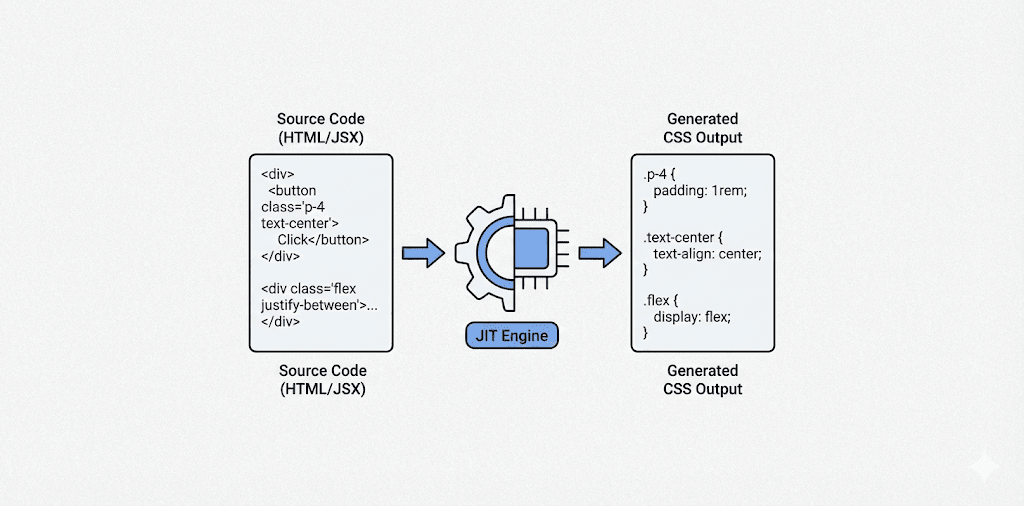
TailwindCSS uses a JIT (Just-In-Time) compilation engine. It scans your code during development and builds, finds the classes you actually use, and generates their CSS on demand. Let's look at what happens at each stage.
Development: Scan and Generate on Demand
In development mode, the JIT engine watches files such as .html, .jsx, .tsx, and .vue for changes. It scans new classes and generates their CSS immediately.
// You add a component during development
function NewComponent() {
  return (
    <div className="bg-gradient-to-r from-purple-500 to-pink-500">
      {/* The JIT engine detects these classes immediately */}
      Gradient background
    </div>
  );
}
The JIT processing flow:
/* Generated CSS */

/* bg-gradient-to-r: set the gradient direction to the right */
/* Use CSS linear-gradient; "to right" means left to right */
/* Colors come from the --tw-gradient-from and --tw-gradient-to CSS variables */
.bg-gradient-to-r {
  background-image: linear-gradient(
    to right,
    var(--tw-gradient-from),      /* Start color */
    var(--tw-gradient-to)         /* End color */
  );
}

/* from-purple-500: set the gradient start color */
/* This class only sets a CSS variable; it does not set background directly */
.from-purple-500 {
  --tw-gradient-from: #a855f7;   /* Purple */
}

/* to-pink-500: set the gradient end color */
/* Also sets only a CSS variable, used together with from-* */
.to-pink-500 {
  --tw-gradient-to: #ec4899;     /* Pink */
}
These three classes show TailwindCSS's compositional design:
bg-gradient-to-r: use a gradient running to the right.from-purple-500: start with purple.to-pink-500: end with pink.
They work together through the CSS variables --tw-gradient-from and --tw-gradient-to to produce the complete gradient. You can mix directions and colors freely without memorizing a separate class for every combination.
- Speed: generate only the CSS you use, rather than a complete CSS file several megabytes in size.
- Precision: use arbitrary values such as
w-[237px]andbg-[#1da1f2]. - Immediate feedback: see the result as soon as you change a class.
Build: A Final Scan and Optimization
At build time, the JIT engine scans all source files, collects the classes in use, and produces a minified CSS file with unused styles removed.
npm run build
The JIT processing flow:
The JIT engine scans only static class names. The following approach will leave you with missing styles:
❌ Incorrect: construct class names dynamically.
// The JIT engine cannot see a complete class name: const color = 'blue';
<div className={`bg-${color}-500`}>  // ❌ Does not generate bg-blue-500
✅ Correct: use complete class names.
// Method 1: Conditional expression
<div className={color === 'blue' ? 'bg-blue-500' : 'bg-red-500'}>

// Method 2: Object lookup: const colorMap = {
  blue: 'bg-blue-500',
  red: 'bg-red-500',
};
<div className={colorMap[color]}>
Configuring TailwindCSS in Different Environments
With that background in place, let's look at configuration in real projects. Build tools such as Vite and Next.js integrate TailwindCSS differently because their CSS processing pipelines differ slightly.
Vite Configuration
Vite has its own plugin system that can handle CSS transformations directly, so TailwindCSS provides a dedicated Vite plugin.
Install the packages:
npm install -D tailwindcss @tailwindcss/vite
tailwindcss: the core engine.@tailwindcss/vite: the Vite plugin that integrates TailwindCSS into Vite's build pipeline.
vite.config.ts:
import tailwindcss from "@tailwindcss/vite";
import { defineConfig } from "vite";

export default defineConfig({
  plugins: [
    react(),
    tailwindcss(), // Use directly as a Vite plugin
  ],
});
src/index.css:
@import "tailwindcss";
Next.js Configuration
Next.js uses PostCSS to process CSS, including its built-in CSS Modules, Autoprefixer, and CSS-in-JS support. TailwindCSS therefore integrates as a PostCSS plugin.
Install the packages:
npm install -D tailwindcss @tailwindcss/postcss
tailwindcss: the core engine.@tailwindcss/postcss: the PostCSS plugin that integrates TailwindCSS into the PostCSS pipeline.
postcss.config.mjs:
export default {
  plugins: {
    "@tailwindcss/postcss": {}, // Use as a PostCSS plugin
  },
};
app/globals.css:
@import "tailwindcss";